
7 Reasons Your Team Needs a Location-Based Project Management Platform
If you have ever managed a project that involves people scattered across an actual physical site, a warehouse, a jobsite, multiple branches, you already know the problem. Your schedule lives in one tool. Your team’s daily updates live in a group chat. Your inventory sits in a spreadsheet somebody forgot to update three weeks ago. And by the time all of that information reaches you, it’s already stale.
That gap between what’s happening on the ground and what’s showing up on your dashboard is where most project delays actually start. Not because people aren’t working hard, but because nobody has a shared, real-time picture of where things actually stand. A true location-based project management platform closes that exact gap.
That’s the problem WayLoader was built to solve.
What is a location-based project management platform?
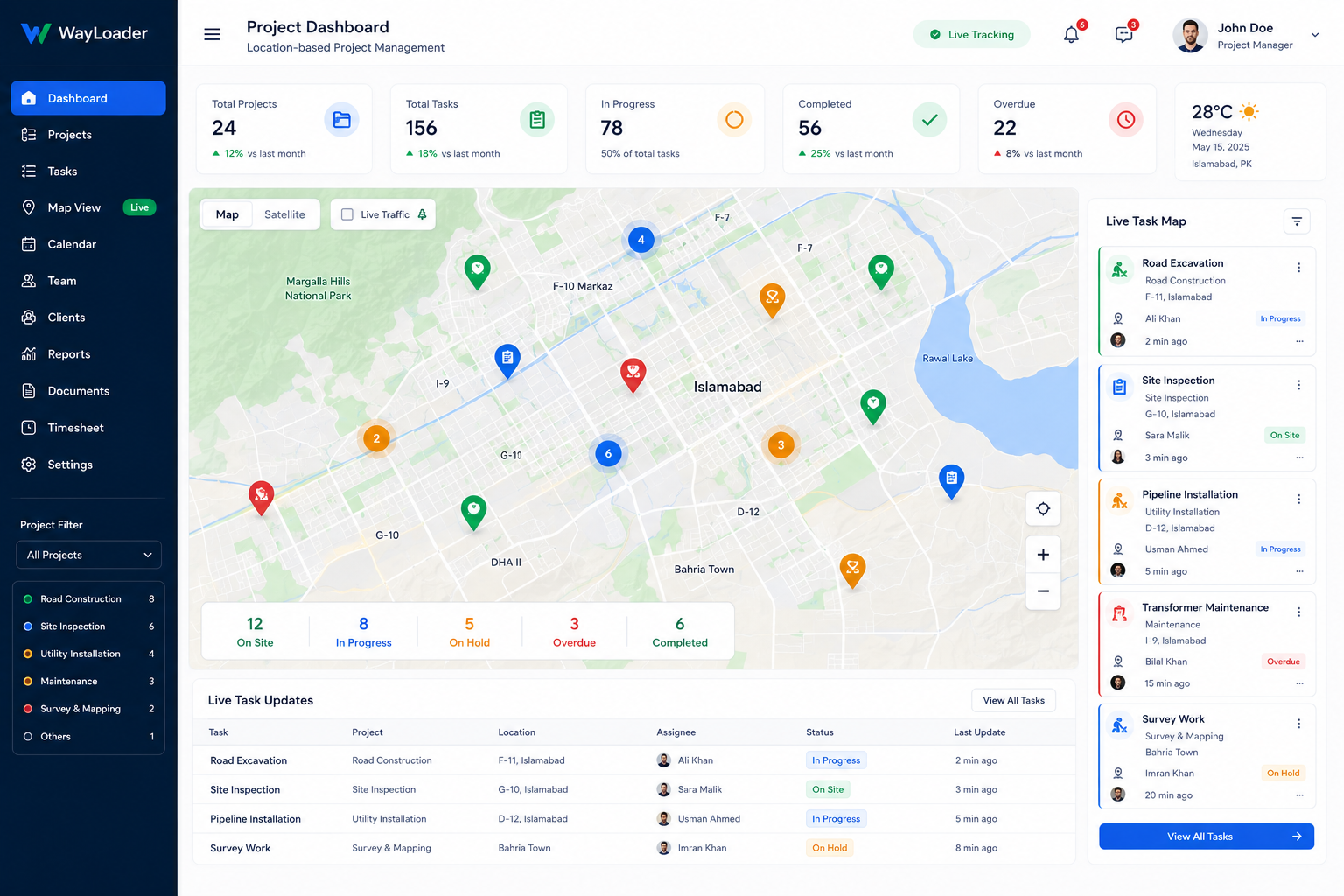
WayLoader is a location-based project and business management platform. Instead of treating your project as a list of tasks on a screen, it ties everything your tasks, your team, your assets, your inventory to actual physical locations. You get a live, map-based view of where work is happening, who’s doing it, and what’s slowing it down.
It’s not a single rigid tool either. WayLoader is built around modules, so you only switch on what your business actually needs:
- Plan – day-to-day task management and scheduling
- Goal – the bigger-picture roadmap that Plan connects into
- People – team communication tied directly to project tasks
- Asset – tracking equipment and maintenance across locations
- Store – warehouse and inventory management
- Fleet – tracking vehicles and mobile resources
- Pay – invoicing and payment tracking
- Docs – centralised project documentation
You don’t have to adopt all eight at once. Most teams start with Plan and Goal, get comfortable, and layer in People, Store, or Asset once they see where the actual gaps are.
The Plan module: location-based project management for daily work
Most project management software is built for people sitting at a desk. WayLoader’s Plan module was clearly built with the opposite user in mind the site supervisor, the field crew, the person who needs to update a task status from their phone while standing next to the thing they just finished.
Plan lets you break a project down into individual work items, assign them to specific people, and pin them to a specific location using geofencing. Instead of a generic to-do list, you get an actual map of your project with live status updates. Steel positioning here, painting there, electrical rough-in over there all visible, all trackable.
There’s also a Kanban view for teams who think in swim lanes, a list view for people who just want to scan through open items, and a lookahead view that’s genuinely useful for spotting scheduling conflicts before they become real problems. If an issue comes up mid-task, whether it’s a missing material or a blocked access point, the team can flag it right there, and it doesn’t get buried in a group chat that nobody scrolls back through.
The Goal module: connecting the big picture to the daily grind
Here’s something anyone who has run a construction or delivery project will recognise instantly: the master schedule and the actual week-to-week work plan almost never talk to each other. One person owns the big Gantt chart. Someone else owns the site-level plan. And updating one rarely updates the other.
Goal exists specifically to close that gap. It’s your macro-level roadmap, but instead of living in isolation, it’s directly linked to Plan. When a task moves in Plan, it feeds back into Goal. When priorities shift at the roadmap level, that context flows down to the people actually doing the work.
That link between macro and micro planning is honestly the part of this location-based project management platform that stands out most. A lot of tools give you one or the other. Very few actually connect them.
The People module: communication that doesn’t get lost in the noise
Every project has a communication problem eventually. Not because people don’t talk, but because the important updates get buried under fifty messages about lunch orders and parking.
People, WayLoader’s messaging module, ties conversations directly to the tasks and projects they’re actually about. You can pin critical updates so they don’t scroll away, chat within the context of a specific work item, and keep formal project communication separate from the general noise. For site-based teams especially, this turns communication from a side conversation into something that’s actually tracked and searchable later.
See how Plan and Goal work together, or browse the full module list.
Built for teams that work outside a desk
WayLoader wasn’t designed as a generic SaaS tool that happens to work for construction. It clearly started from lean project management and last planner principles the kind of thinking that comes from people who’ve actually run job sites, not just software teams guessing at what site managers need.
That shows up in the industries it’s built for:
- Construction – tracking constraints, blockers, and takt planning for work fronts
- Real estate – managing portfolios of properties and spaces
- Facilities management – tying assets and maintenance to physical locations
- Healthcare – coordinating project work across facilities
- Public sector and nonprofit organisations – managing delivery with accountability built in
- Software development and hospitality – for teams that still need location context, even outside physical construction
The common thread across all of these is simple: teams that need to know not just what is happening, but where, and who’s responsible for it right now.
Why a location-based approach actually matters
It would be easy to write this off as a gimmick another dashboard with a map bolted on for looks. But the reason location matters here is practical, not decorative.
When you can see your resources, your team members, your equipment, your supply chain laid out geospatially, you catch problems that a plain task list would never surface. A crew sitting idle two floors away from where a delivery just arrived. A piece of equipment that’s been parked at the wrong site for three days. A warehouse running low on materials for a job that starts Monday. None of that jumps out of a spreadsheet. It jumps out of a map.
Getting started with this location-based project management platform
If you’re evaluating WayLoader for your own team, the honest advice is to start small. Turn on Plan and Goal first, get your team comfortable with task-level tracking and the macro roadmap link, and add People once daily communication starts happening inside the platform naturally. From there, Asset, Store, and Fleet make sense once you actually feel the gap they fill, rather than switching everything on at once and overwhelming your team.
WayLoader also offers free training and support to help teams get set up, which matters more than it sounds like it should. The best project management tool in the world is useless if your field team never adopts it.
The bottom line
Most project management platforms ask you to translate real-world work into abstract tasks and hope nothing gets lost in translation. A location-based project management platform like WayLoader takes a different approach: it keeps the physical, on-the-ground reality of your project front and centre, and builds the planning, communication, and tracking tools around that reality instead of around a generic task list.
If your team has ever felt like the dashboard says one thing and the jobsite says another, that’s the gap this platform was built to close.
Want to see how WayLoader’s Plan and Goal modules work together on a real project? Get started or explore the full list of modules.